
Withdraw Problem
Q : How i can submit issue about Withdraw Problem on self-service
center BDWINGO ?
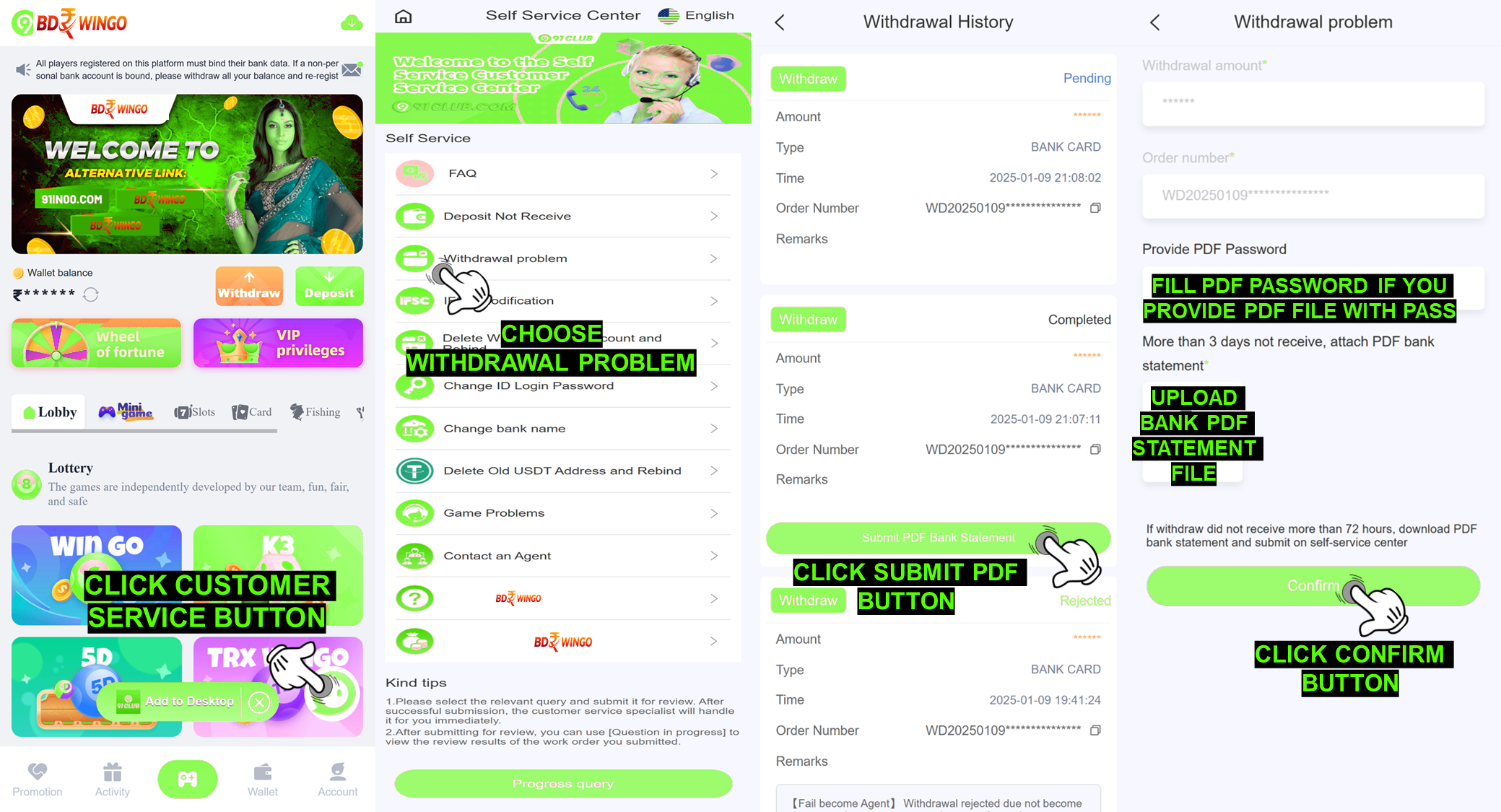
A :To submit Withdraw Problem on self-service center
BDWINGO, please follow the step below :
Login to your BDWINGO ID Account
Click Customer Service button
Choose Withdraw Problem
Choose Submit PDF Bank Statement to the withdraw order that you
willing to solve
Fill the PDF statement password if you put a password on your PDF file
Upload your bank PDF statement
Click the "Confirm" button
STATUS
ISSUE
Q : How do i check my status issue Withdraw Problem on
self-service center BDWINGO ?
A : You can check the status issue by pressing the
"Progress Query" for checking all the order record status that you have been
submitted to self-service center.
SUCCESS
STATUS
Q : I already checking and the status in here already success and there is a
notes Success "Withdraw success process to your bank account
UTR:" what is that mean ?
A : This mean your withdrawal already completed and there
is UTR number give by BDWINGO withdrawal department just check on the bank
account you used for withdrawal.
REJECT
STATUS
Q : What about with status reject i need to know if my Withdraw
Problem issue get reject by BDWINGO account department?
A : Okay rest assured we will help to explain to you there
is few possibility that make your account got rejection and we will give
explanation on this below :
Reject "Bank under maintenance try again later":
BDWINGO withdrawal department reject your withdrawal due bank you use
for withdrawal under maintenance and you can try resubmit withdraw
later.
Reject "Resubmit correct IFSC code again": This mean
IFSC code bank on bank data account for withdrawal is incorrect you need
to submit issue IFSC Modification to modify IFSC code
correctly.
Reject "Incorrect bank detail, please modify": This
mean you need to modify bank data because BDWINGO withdrawal department
check the bank account you bound is incorrect, you just need to submit
issue for Delete Bank Account and rebind a new correct
bank information.
Reject "System detect illegal bet, contact customer
service": This mean your account BDWINGO has detected by
system do illegal betting and you need to contact BDWINGO customer
service to help you with this issue.
Reject "There is technical issue, resubmit again": For
this issue you need to resubmit withdrawal again when processing your
withdrawal there is problem on BDWINGO withdrawal department.
Reject "Contact our agent first to help withdraw
reject": This mean you need to contact your superior agent
to help you with becoming agent.
Reject "Spam claim gift code, withdraw rejected":
BDWINGO withdrawal department reject the withdrawal because the account
has detected do claiming gift code more than the limit and you need to
contact the customer service BDWINGO for assistance.
Reject "UCO BANK not available, please change your
bank": For UCO / SUCO bank no longer available on BDWINGO
for withdrawal so you need to modify the bank account data by submitting
the issue Modify Bank Account Number.
Reject "Withdraw failed, balance return to BDWINGO account"
:This mean your withdrawal failed and already attempt so
many times the BDWINGO bank processing it we can suggest you to try it
again later or modify the bank account because there might be issue with
the bank account you using.